
Save a page
- Visit an ordinary web page you want to keep.
- Click the pinned boomation toolbar button, or press the default Alt+B save shortcut. Full Popup uses Save; Quick and Alt+B begin saving the current page immediately.
- Choose a Workspace and Page, then add a useful title, Category, Tags or Note.
- Choose Done to save your edits. The initial Bookmark saved message refers to the first save; closing the popup does not save later edits.
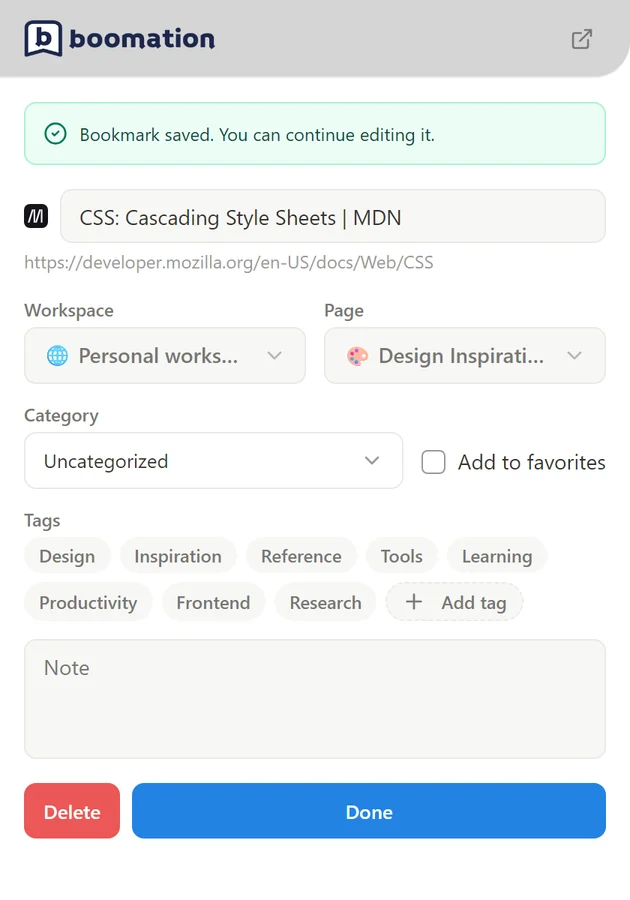 Enlarge screenshot
Give it a home
- Open the main page and choose the same workspace and page.
- Use Manage categories to create a group such as Reading or Reference, then assign the bookmark to it.
- Mark a frequently used link as a favorite with its star. Add a note explaining why you saved it.
Find it again
Type a word from the title, URL or note into the page search. Try Table, Board or Cards to see the same bookmarks in different layouts. If a bookmark appears to be missing, clear active filters and confirm the workspace and page first.