
Choose the search scope
The page search narrows the list you are currently viewing. Use All bookmarks when you need to browse across pages in the workspace. The sidebar search opens the workspace search interface; it is a better starting point when you do not remember the page.
 Enlarge screenshot
Quick search while browsing
- On a regular website, press Ctrl+Shift+Q to open Search bookmarks. The actual assigned shortcut may differ; check General settings or chrome://extensions/shortcuts.
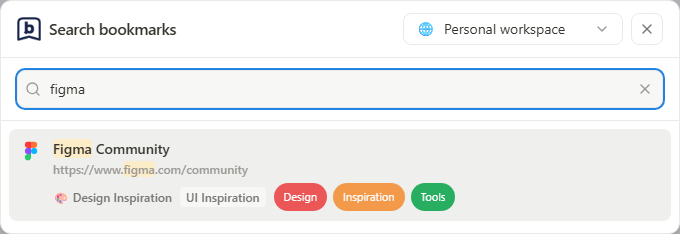
- Choose a workspace from the menu beside the close button. With no query, the overlay shows that workspace’s favorites; an empty workspace favorites list shows a message.
- Enter part of a title, URL or note. Results include the bookmark’s page and any category, tags or matching note text. Search covers all pages in the selected workspace, not all workspaces at once.
- Click a favorite or result to open it. In the search input, use Up/Down to select a result and Enter to open it. Press Escape, click outside the dialog or use the close button to dismiss it.
 Enlarge screenshot
Which workspace opens by default?
With Startup view set to a fixed destination, each new overlay opens in the specified workspace. Full Popup opens that workspace and the specified page.
With Startup view set to the previous location, the overlay remembers its own last workspace. Full Popup separately remembers its own workspace and page; switching one does not change the other’s remembered location.
Changing workspace updates both favorites and search results. You can switch while the overlay is open even in fixed mode; the fixed workspace is applied again the next time you open it.
Search stored details
- Enter a word from the bookmark title, part of its URL or text from its note.
- Inspect the results and their page or category context.
- Open the result, or clear the query to return to the full list.
- If nothing appears, remove active filters and confirm the workspace before trying another phrase.
What search does not do
This search finds saved bookmark details. It is not full-text search inside the destination website, semantic AI search or a web archive. Full Popup has its own search field for browsing from the toolbar. The search at the top of this documentation site searches guides, not your personal bookmarks.