
Switch collections
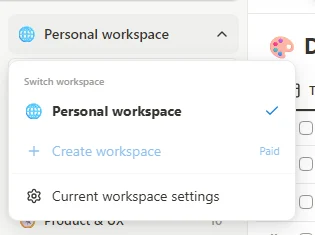
Open the workspace selector at the top of the sidebar and choose a workspace. The current item uses bold text and a check. Workspaces contain their own pages, bookmarks and tags; switching changes which collection you browse.
 Enlarge screenshot
Create and arrange
- Choose Create workspace and enter its name and icon when prompted.
- Open the selector again to verify the new workspace.
- With Pro or an active trial, hover a workspace item to reveal its drag handle, then drag the item to change its order.
- Choose Current workspace settings to edit its name and icon, then Save changes.
Delete only after making a backup
The current workspace settings include a Danger zone. Permanent deletion removes that workspace's pages, tags, bookmarks and Trash. At least one workspace must remain. Download backup and delete can preserve a workspace backup first, but Trash is not included. This is not the recoverable bookmark-delete action.