
Combine filters
- Use the star control to show favorites only when needed.
- Open category or tag filters. Use checkboxes to select multiple values, or click an item's label for a quick single selection.
- Review the active-condition badge. Filters affect the results you see, not the bookmarks stored in the workspace.
- Click the clear-filter control to remove active filter settings. It disappears when there are no active filter conditions.
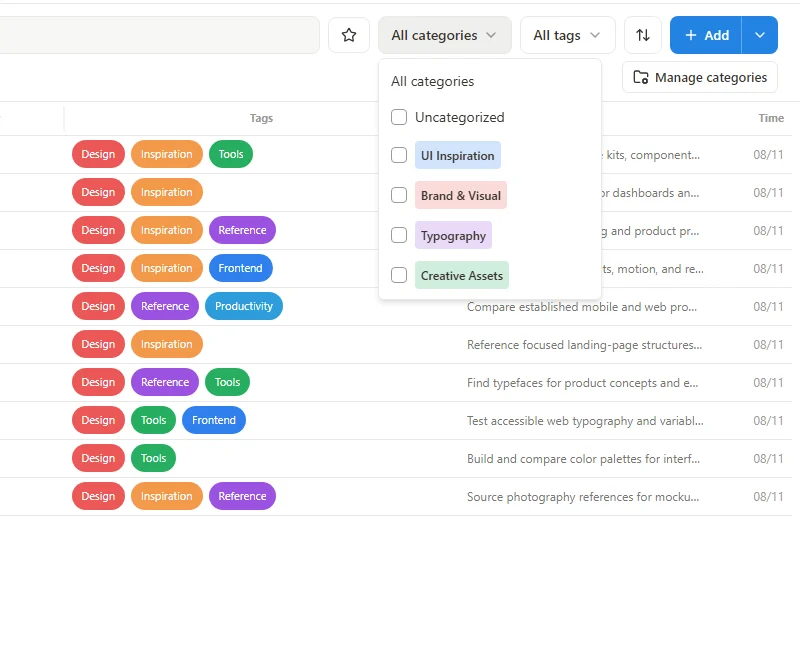 Enlarge screenshot
Choose an order
| Order | Use it for |
|---|---|
| Manual order | Your own arranged bookmark positions. |
| Title A–Z / Title Z–A | Alphabetical or reverse title order. |
| Website A–Z / Website Z–A | Ordering by the website. |
| Newest / Oldest | Ordering by the bookmark's saved time. |
If a bookmark seems missing
Clear search text as well as filters, then check the selected workspace and page. Changing the sort direction only moves a record's position in the list; it does not remove it. Return to Manual order before trying to maintain a custom drag order.