
Add a bookmark from the main page
- Open the workspace and page where the link belongs.
- Click Add to open the Add bookmark dialog. Enter a descriptive Title and the complete URL.
- Check Workspace and Page, then choose Category, Tags, Note or Add to favorites as needed.
- Click Save. Confirm the bookmark appears in the selected page; clear filters if they hide the new item.
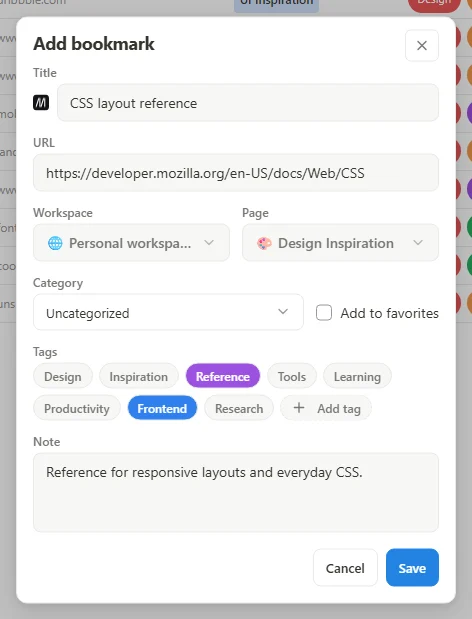 Enlarge screenshot
Change an existing bookmark
Open the bookmark's action menu and choose its edit action. Update the fields and save. Use the move action when the bookmark belongs on another page or in another workspace; renaming a bookmark does not move it.
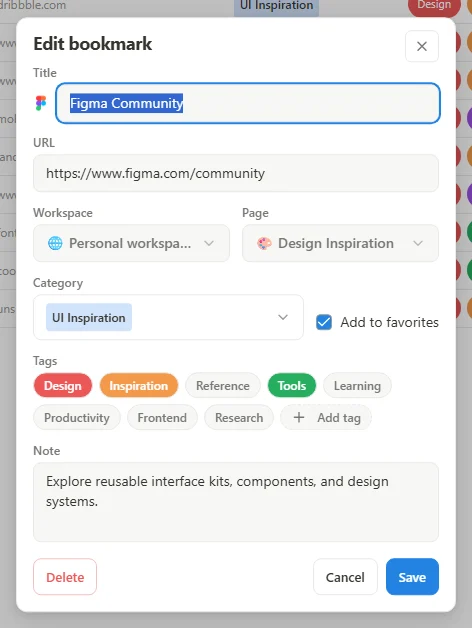 Enlarge screenshot
Check the result
Open the saved link to verify its destination. A bookmark stores a URL, not a permanent offline copy of the page. Protected browser pages or websites you cannot access may not be suitable for quick saving.