
Save several open tabs
- Choose the destination workspace and page on the main page.
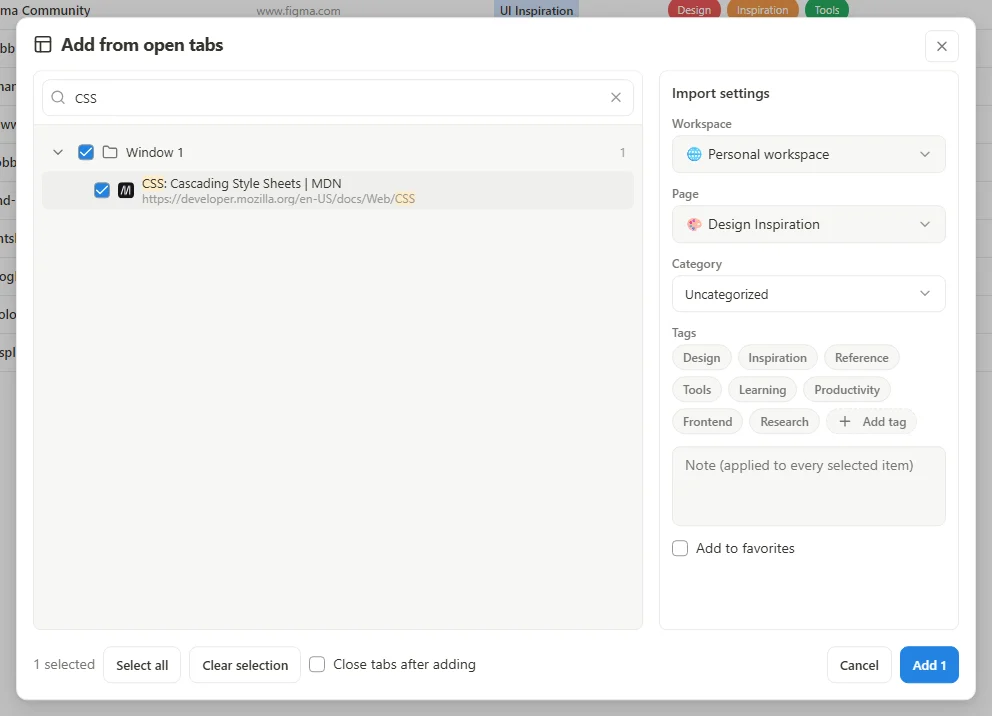
- Open the menu beside Add and choose Add from open tabs.
- Review the listed tabs, select the ones you want, and confirm the destination before adding them.
- Check the result and any skipped-item or plan-limit message. Full Popup's Save tabs opens the main page's tab picker.
 Enlarge screenshot
Copy existing browser bookmarks
Choose Add from bookmarks from the Add menu to select existing browser bookmarks. The first-run Import browser bookmarks option is another starting point. These operations copy links into boomation; they do not remove the originals or continuously synchronize the browser bookmark tree.
Import a bookmarks file instead
For a saved .html file, use Settings and plans → Import / Export → Import bookmarks. That flow adds pages and bookmarks rather than replacing the whole workspace. HTML import can skip invalid entries or items beyond your available capacity; read its completion summary before deleting any original files.